What are Google
Core Web Vitals,
and why do they matter?

By Max Ikaheimo
October 1st, 2026
Core Web Vitals are three metrics Google uses to measure how a page feels to real users: how fast the main content loads, how quickly the page responds to interactions, and how stable the layout is while it loads. They're measured from real Chrome users visiting your site, not just from lab tests, and they're part of the page experience signals Google uses in search.
This guide explains what each metric measures, what counts as a good score, how to check your own site and what usually fixes a poor result.
What are the
Core Web Vital metrics?
The Core Web Vitals are Largest Contentful Paint (LCP), Interaction to Next Paint (INP) and Cumulative Layout Shift (CLS). Other metrics, such as First Contentful Paint and Time to First Byte, help with diagnosis, but only these three are used in the Core Web Vitals assessment. INP replaced the older First Input Delay (FID) metric in March 2024.

Largest Contentful Paint (LCP) measures loading performance: the time until the largest image, text block or video in the viewport has rendered. If your page opens with a large hero image, LCP is usually the time it takes for that image to appear.
Interaction to Next Paint (INP) measures responsiveness: how long the page takes to visibly respond after a user clicks, taps or presses a key. Unlike FID, which only looked at the first interaction, INP considers interactions throughout the whole visit and reports one of the slowest. A button that seems to do nothing for a moment after it's clicked is a typical INP problem.
Cumulative Layout Shift (CLS) measures visual stability: how much visible content moves around unexpectedly while the page loads. Images without set dimensions, late-loading ads and banners, and web fonts swapping in are common causes.

What counts as a good score?
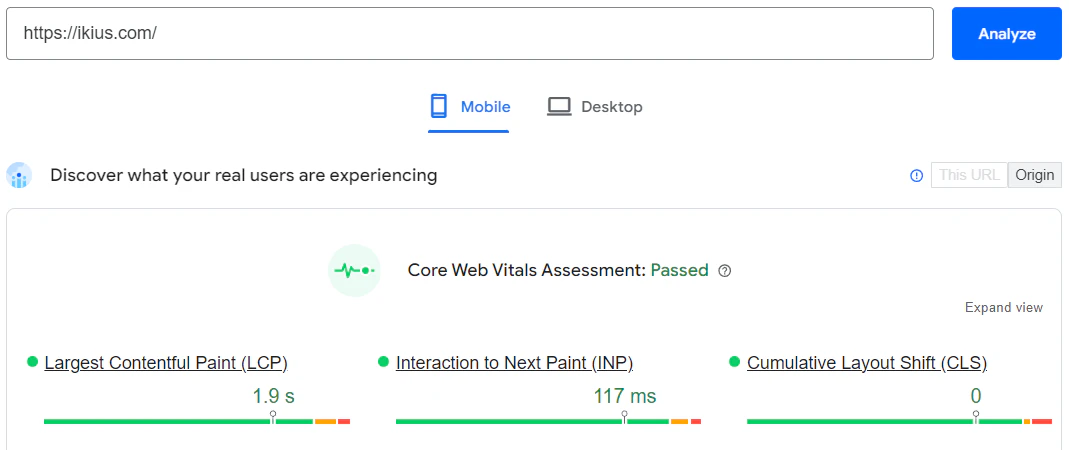
Google evaluates each metric at the 75th percentile of page visits, separately for mobile and desktop. A page passes when all three are in the "good" range:
LCP: 2.5 seconds or less is good, over 4 seconds is poor.
INP: 200 milliseconds or less is good, over 500 milliseconds is poor.
CLS: 0.1 or less is good, over 0.25 is poor. CLS is a score, not a time.
Why do Google
Core Web Vitals matter?
Core Web Vitals are a ranking signal, but not the strongest one. Relevance and content quality come first, and a page with poor Core Web Vitals can still rank well if it's the best answer to a query. Where they make a difference is between pages that are otherwise similar.
Let's say there are two companies, X and Y, competing in the same industry with equal sites in terms of content, branding and so on. X passes Core Web Vitals, but Y does not. Guess which one ranks higher?
The bigger benefit is often outside SEO. Faster, more responsive and more stable pages are simply better to use, which tends to show up in engagement and conversion rates. Your website is often the first contact people have with your company, and it shapes how your brand is perceived.
How to check your Core Web Vitals
PageSpeed Insights (pagespeed.web.dev) shows real-user field data for a URL when enough data exists, plus a Lighthouse lab test for diagnosis.
Google Search Console has a Core Web Vitals report that groups your URLs by status, which is the quickest way to see problems across a whole site.
Chrome DevTools and Lighthouse are useful for debugging during development, but lab results don't always match what real users experience.
The web-vitals JavaScript library lets you collect the same metrics from your own visitors and send them to your analytics.
How to improve each metric
Improving LCP
Make the largest element load first: serve properly sized, modern image formats, avoid lazy-loading the hero image, preload critical resources, reduce server response times and use a CDN. Server-side rendering or static generation helps, because the main content arrives in the initial HTML.
Improving INP
Keep the main thread free. Break long JavaScript tasks into smaller ones, ship less JavaScript, defer non-critical third-party scripts and avoid heavy work in event handlers. Third-party tags such as chat widgets and trackers are a frequent cause.
Improving CLS
Reserve space for everything that loads late: set width and height on images and video, reserve room for embeds and banners, and load fonts in a way that doesn't shift text when they swap in.
Core Web Vitals and your tech stack
Your framework and hosting decide how hard this is. Modern frameworks such as Next.js handle image optimization, code splitting and server rendering out of the box, which covers a lot of LCP and CLS work. Our post on the SEO benefits of Next.js goes into more detail, and the Credaris case study shows a site we built to pass the Core Web Vitals assessment.
If your site fails the assessment and you're not sure where to start, our development team can audit it and fix the root causes, or help you decide whether a rebuild makes more sense than patching.
Contact us
Get in touch and let's discuss your business case
Submitting this form will not sign you up for any marketing lists. Your information is strictly used and stored for contacting you. Privacy Policy
Related posts: